Posts

Showing posts with the label Expression Blend

Attaching Preview behavior to a WPF Slider control

Image
Technorati Tags: MediaPlayer Style , Theme , WPF , XAML , ControlTemplate Today I am sharing about a common usage of Slider control for the Timeline scenarios as we can see in many Media players. The above pictures shows timeline/scrubber control of some popular video players( Hulu and Youtube ). We can edit the Slider Style and ControlTemplate to create the same look and feel of the above two scrubbers except the preview value get displayed when we hover over. While figuring out an easy way to build this, I got two different options. The first and the obvious solution is to extend the Slider class to create a new custom control, which will have a new DependancyProperty called PreviewValue to hold the mouse over value. The biggest challenge in this approach is to make this control as much flexible(design and dev friendly) because people may customize the control by giving different Size and Margins to the Track and other parts of the Control template, which will make our assumpti...

Sunny Orange - WPF Theme 1

Image
Recently I found out that I have an old blog post about Control Templating a Button, getting a lot of hits. Many out there are looking for free control templates and themes for WPF/Silverlight applications. I am planning to publish few WPF/Silverlight themes in the coming posts. So here I am publishing a simple theme which has almost similar colors to the old blog post. It contains very basic set of controls.  1)Button 2)ToggleButton 3)ComboBox 4)TextBox 5)CheckBox 6)RadioButton 7)ScrollBar 8)ScrollViewer 9)ListBox 10)ProgressBar 11)Slider You can find the source XAML style here -   SunnyOrange_Theme.xaml WPF control theming and templating is very interesting and fun task in the WPF application development, it took only an hour or two for me to create this theme file. Please let me know your valuable feedbacks and suggestions .

A simple Multiselect ComboBox using expression Blend

Image
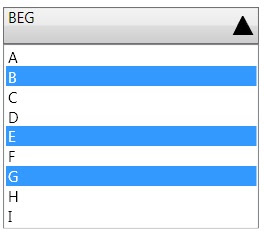
I have often seen requirements to have a combobox with multiple selection enabled. We know thatWPF ListBox control is having two special properties, which enables the multiple selection but the combobox doesnt have those public IList SelectedItems { get; } public SelectionMode SelectionMode { get; set; } There are many ways we can make a multiselect combo box 1)Create a custom control from the scratch and have a Listbox in the dropdown 2)Extend the combobox and add the above properties to it 3)Edit the Combobox control template to add necessary controls and binding. I am going to describe the 3rd idea from the above list, which is a total Expression Blend work, so no need of VS2008 to make a multiselect combobox from a simple combobox. Place a combobox in to the editing area and right click on the control to create an copy of the Control template. Now you can see the Control's tree on the left side of Expression Blend The ItemPresenter inside the scrollviewer is actually the...

XAML Balloon Comments - Expression Blend Tip

Image
It is often a requirement in Silverlight and WPF that to create Balloon kind of UI for Toolip popups. It can be done in many ways. I am listing out few of the common Balloons you might be interested in.   < Grid             < Grid.RowDefinitions >                 < RowDefinition Height ="*"/>                 < RowDefinition Height ="30"/>             </ Grid.RowDefinitions >             < Rectangle RadiusX ="10" RadiusY ="10" Stroke ="#FF000000"/>             < Path Fill ="#FFFFFFFF" Stretch ="Fill" Stroke ="#FF000000" HorizontalAlignment ="Left" Margin ="30,-1.6,0,0" Width ="20" Grid.Row ="1"                 Data ="M22.166642,154.45381 L29.999666,187.66699 40.791059,154.54395"/>             < TextBlock HorizontalAlignment ="Center" V...

Interactive Silverlight Greeting Card

Image
For the last couple of days I was trying to make an animated e-card using Silverlight. So here is the final result. The speciality of this card is that when we move the mouse over the card we can see it as if it is a 3D object and get the perspective view of the objects(Papervision 3D?). All the Trees and Mountains are Path objects and the particles falling down are random sized ellipses. I have used Microsoft Expression Blend to do most of this work Click here to see the Card in action. The important part of this Silverlight appplication is a Custom Panel called  SpacialArrangePanel . This panel will arrange its children based on two Attached Dependancy Properties. 1) HangingPoint - A point determines its X and Y position in the space 2) ZDistance - A double value determines how far the object is in the Z-plane. There is another DependancyProperty in the Panel called CameraPoint, which has been hooked to the Mouse Move points so that the mouse pointer acts as an Eye/Camera view point ...

Concave cornered Rectangle - Expression Blend Tip

Image
An expression blend tip to create a Path looks like a concave cornered rectangle.  Put a Grid with 5*5 rows and columns. and add 4 ellipse and a rectangle as in the following XAML. < Grid x : Name ="grid" > < Grid.ColumnDefinitions > < ColumnDefinition Width ="0.1*"/> < ColumnDefinition Width ="0.1*"/> < ColumnDefinition Width ="0.6*"/> < ColumnDefinition Width ="0.1*"/> < ColumnDefinition Width ="0.1*"/> </ Grid.ColumnDefinitions > < Grid.RowDefinitions > < RowDefinition Height ="0.1*"/> < RowDefinition Height ="0.1*"/> < RowDefinition Height ="0.6*"/> < RowDefinition Height ="0.1*"/> < RowDefinition Height ="0.1*"/> </ Grid.RowDefinitions > < Rectangle Fill ="#FF000000" Grid.Column ="1...

WPF Clock

Image
I had written a blog a long time back on creating a simple WPF clock . It was actually one my first few sample applications that I built when I got to fiddle with Expression Blend for the first time. Only today I noticed that the hyperlink to the Source code on the blog was actually broken for a long time and there are still quite a few asking me for the source code. So I am posting the same here with out even looking in to what I have done 1.5 years back :). Ofcourse I had to convert the source to VS2008(.NET3.5) Download the Exe Here and Source code